Building Personal AI Assistant with GitHub Copilot SDK
Guide to building personal AI assistants using GitHub Copilot SDK, covering session management, custom tools, and more.
Neo: A personal AI agent accessible via Telegram, built with GitHub Copilot SDK.
Why GitHub Copilot SDK
It wraps the Copilot CLI as a JSON-RPC server and provides a single session API that handles model switching, tool execution, session persistence, and memory compaction.
The SDK does not implement the agent itself. It communicates with the Copilot CLI, which runs the agent runtime responsible for planning, tool execution, and model calls.
Copilot CLI runtime provides built-in tools:
- Models: Access Copilot-supported models (Claude, GPT, Gemini, etc.)
- Bash: Run shell commands and capture output
- Code tools: File viewing, regex search, patch application
- Web tools: Search the web, fetch URLs
- GitHub: Issues, PRs, commits, code search, Actions via built-in MCP
- Memory: Structured memory with
store_memory - Parallel execution: The agent can plan and execute multiple tool calls within a single turn
- User input: Ask questions; the SDK bridges to the transport layer
Pricing
GitHub Copilot Pro+ costs $40/month and provides 1500 premium model requests per month which includes access to all frontier models.
For higher usage, bring custom API keys. The SDK supports ANTHROPIC_API_KEY and OPENAI_API_KEY directly.
What Neo does
Neo is owner-only, controlled via Telegram. It wraps Copilot SDK as a session per chat with these additions:
Custom tools (defined with defineTool() and Zod):
browser: Automate websites with Playwright, store login credentials, take screenshotsreminder: Cron-based reminders (once, daily, weekly, monthly, weekdays)job: Schedule recurring AI prompts (e.g., daily summary, weekly review)memory: Read, write, search persistent memory filesconversation: Search and retrieve past chat historysystem: Introspect settings, apply safe config changes, restart Neo
Session features:
- Per-chat model picker (override default Copilot model)
- Layered memory: daily logs, weekly summaries, channel overlays
- Live progress UI (thinking, reasoning, tool, done)
- Voice input via Deepgram STT
- Automatic context compaction when conversations get long
- Session hooks for pre/post tool use, error handling, cleanup
Autonomy:
- Neo can edit its own persona (lives in
SOUL.mdsimilar to OpenClaw) - Can change its log level and memory compaction settings
- Can request a clean restart (recorded in history)
How easy is it
The following demonstrates the three core SDK primitives.
1. Create a session
// File: src/agent.ts
import { CopilotClient, approveAll } from "@github/copilot-sdk";

const client = new CopilotClient({ githubToken: process.env.GITHUB_TOKEN });
await client.start();

const session = await client.createSession({
  systemMessage: {
    role: "system",
    content: "You are my personal assistant.",
    mode: "replace",
  },
  tools: allTools,
  onPermissionRequest: approveAll,
});

await session.send("Check the weather");
A session with model access, built-in tools, and a custom system prompt is created. Sessions are async.
2. Define a custom tool
// File: src/tools/reminder.ts
import { defineTool } from "@github/copilot-sdk";
import { z } from "zod";

export const reminderTool = defineTool("reminder", {
  description: "Create, list, or cancel reminders",
  parameters: z.object({
    action: z.enum(["create", "list", "cancel"]),
    message: z.string().optional(),
    fire_at: z.string().optional(), // ISO 8601 UTC
    recurrence: z.enum(["once", "daily", "weekly", "monthly"]).optional(),
    id: z.number().optional(),
  }),
  handler: async (args) => {
    return `Reminder created for ${args.fire_at}`;
  },
});
Register it in src/tools/index.ts:
import { reminderTool } from "./reminder.js";

export const allTools = [reminderTool /* ...others */];
Pass allTools to session config. The agent can set reminders.
3. Wire user input to your transport
The SDK has an ask_user tool. When onUserInputRequest is provided, it calls the handler when the agent needs clarification:
// File: src/agent.ts
onUserInputRequest: async (question) => {
  // Send to Telegram, wait for reply
  await bot.sendMessage(chatId, question.question);
  return await waitForNextUserMessage(chatId);
},
The agent can ask questions in Telegram and wait for responses.
Architecture
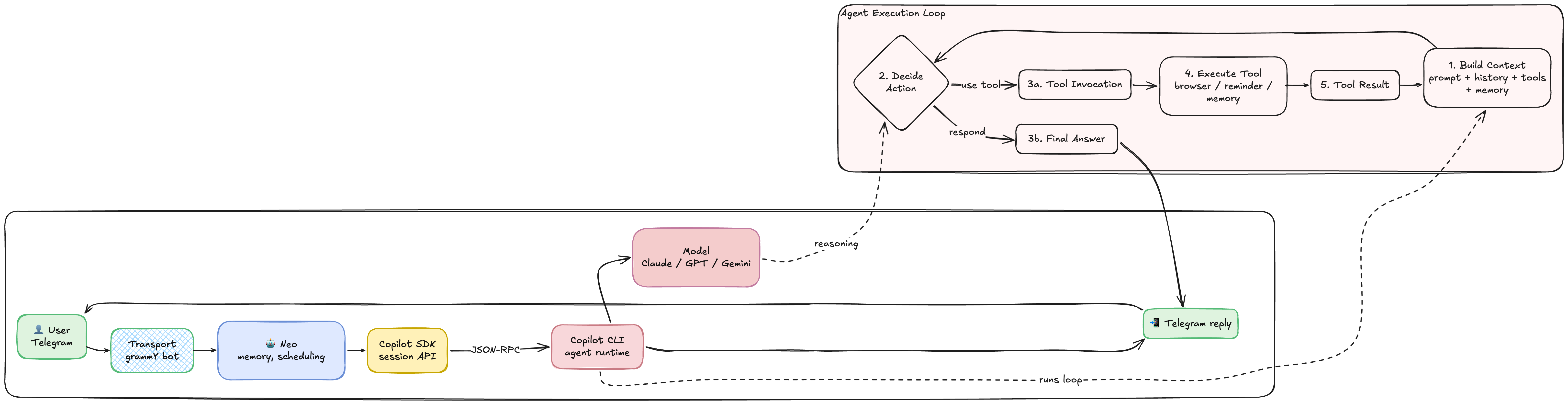
A single send() call handles streaming, tool loops, retries, and context management. Listeners observe session events for progress UI (tool_use, reasoning, etc.) and surface results to the transport layer.
Full code example: Add a reminder
User sends: "remind me to review my savings account on Monday at 8am"
Agent flow:
- Agent recognizes intent, calls
remindertool withaction: create - Handler schedules the reminder (stores in SQLite with cron metadata)
- Agent confirms: "Reminder set for Monday 8:00 AM"
- On Monday 8am, job-runner executes a scheduled prompt: "It's 8am. Remind the user to review savings."
- Telegram message arrives
Deployment
Neo supports Docker and systemd (both system and user service).
Docker:
cp .env.example .env
docker compose up -d
docker compose logs -f
systemd (user service, like OpenClaw):
./deploy/setup-ubuntu.sh # Prompts for scope (system/user), installs everything
Service auto-restarts on crash. Data lives in ~/.neo by default.
Checkout the code: github.com/saadjs/neo
References
- GitHub Copilot SDK: https://github.com/github/copilot-sdk
- grammY Telegram Bot Framework: https://grammy.dev/
- Playwright: https://playwright.dev/
- Deepgram STT: https://deepgram.com/
Happy Coding!